Inhaltsverzeichnis
Inhaltsverzeichnis
In the ever-evolving world of WordPress plugins, BackWPup has long been a trusted name for creating reliable backups. We’re excited to announce the release of BackWPup 5.0—your favorite backup tool just got an impressive upgrade!
The new interface is sleek and user-friendly, giving you the feeling of using a brand-new plugin. We’ve streamlined every aspect to make your backup process effortless. Whether you’re a WordPress newcomer or a seasoned expert, you’ll appreciate the ease and efficiency of this updated version.
Vereinfachte Erstellung von Backups: Der neue 3-Schritte-Assistent
One of the standout features of BackWPup 5.0 is the new 3-Step Backup Wizard. Now, everything you need is on one neat screen. Want to backup your files, database, or both? Just pick what you need – it’s that simple! This intuitive process guides you through creating comprehensive backups with fewer clicks than ever before.
Schritt 1 – WAS – Wählen Sie die zu sichernden Inhalte aus
In der bisherigen Benutzeroberfläche gab es für jeden Teil des Auftrags separate Registerkarten, über die Sie die Datenbanksicherung, den Zeitplan und weitere Einstellungen konfigurieren konnten.
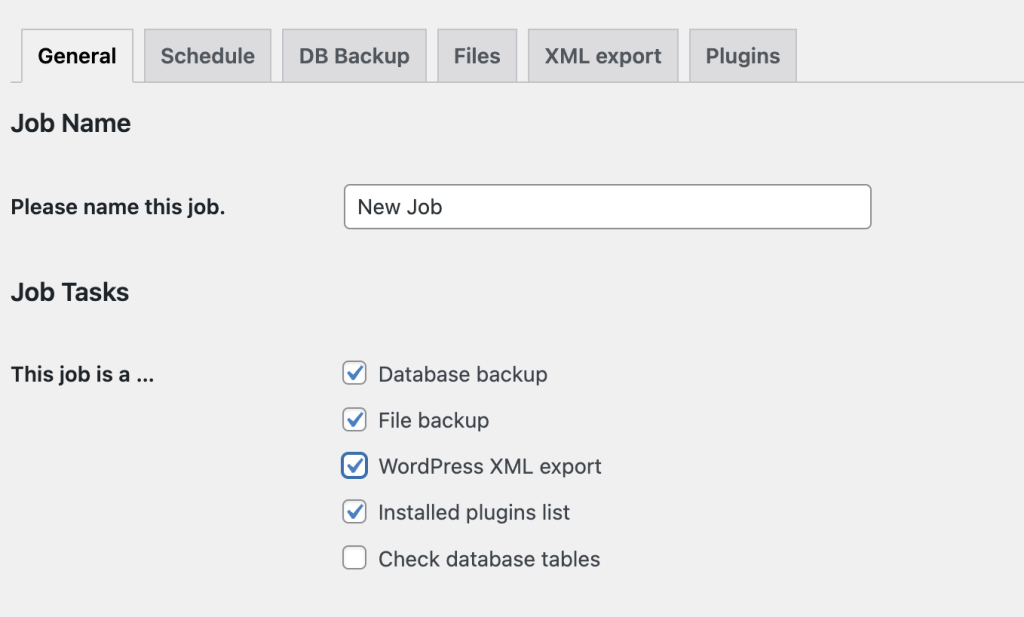
Mit Version 5.0 können Sie nun über unseren intuitiven Einrichtungsassistenten den Inhalt Ihrer Sicherung auswählen. Sie können festlegen, ob Sie Dateien, Datenbanken oder beides sichern möchten. Außerdem finden Sie alle relevanten Einstellungen für Ihre Sicherung übersichtlicher angeordnet.

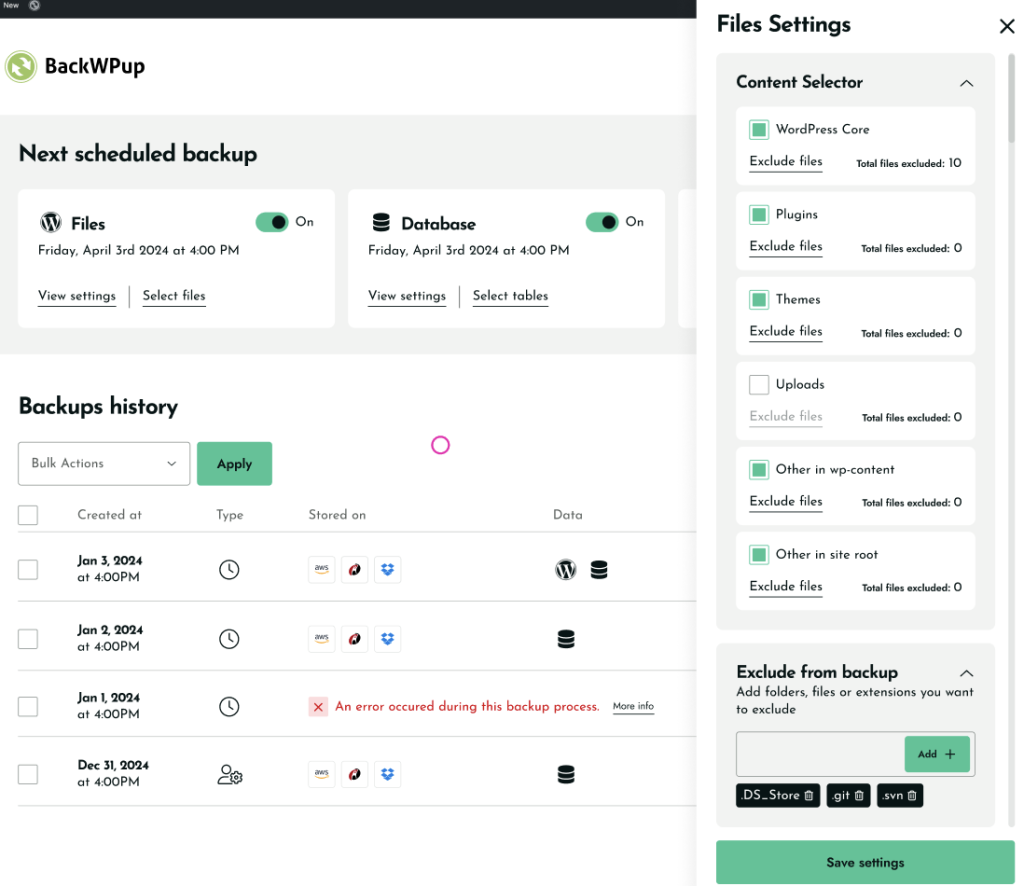
Dateien-Einstellungen
In this section, you can select which files and folders you want to include or exclude in your backup. For your files, choose exactly what you want to include or exclude – WordPress core files, themes, plugins, uploads – it’s all there.
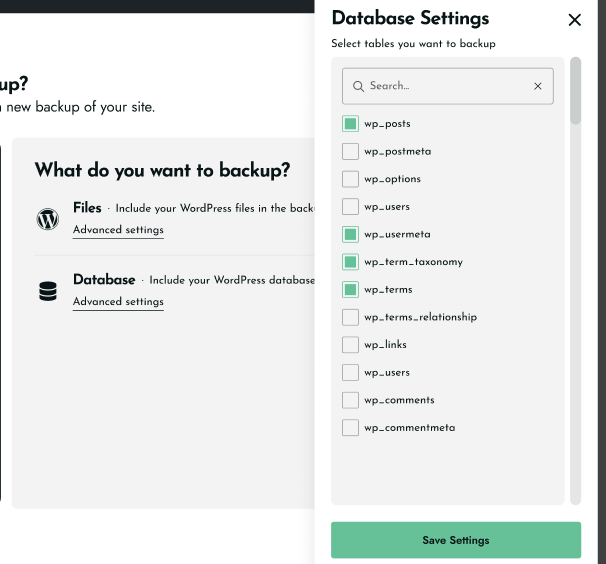
Datenbankeinstellungen
In this section you can choose to backup your entire WordPress database or select specific important tables. This flexibility allows you to preserve all your posts, pages, and settings, or focus only on the essential data you need by offering granular control over your database backups. It’s like having a custom-tailored backup suit for your database. This fine-tuned control means you can keep your backups lean and mean.
Schritt 2 – WANN – Legen Sie Ihren Sicherungszeitplan fest
In unserer bisherigen Benutzeroberfläche konnten Sie zwar auf die Option „Zeitplan“ zugreifen, mussten jedoch zur Seite „Aufträge“ navigieren, um die Übersicht anzuzeigen.
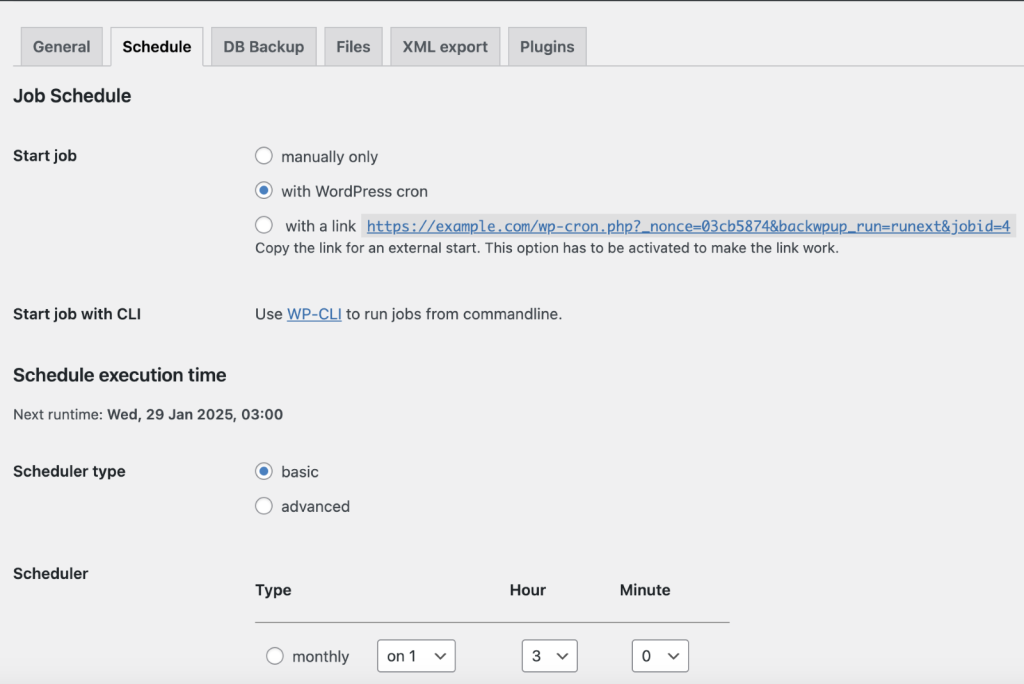
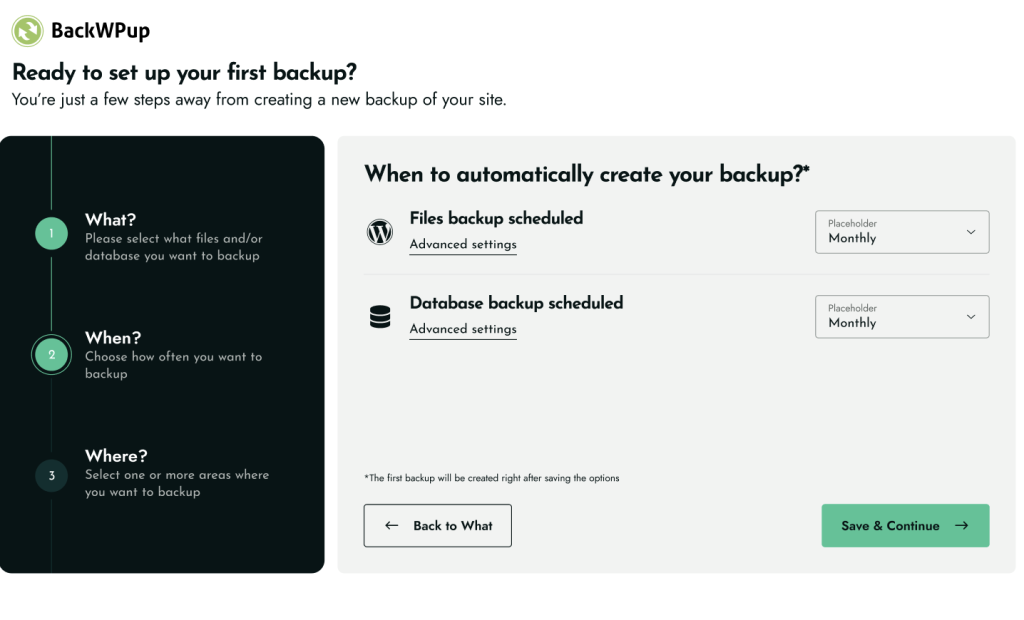
Unsere neue Benutzeroberfläche macht die Auswahl Ihres bevorzugten Zeitplans so einfach wie möglich. Sie können die Häufigkeit der Datensicherung ganz einfach anpassen – egal, ob täglich, wöchentlich oder monatlich.
Schritt 3 – WO – Speicherort für die Sicherung auswählen
You’ve now arrived at the final and crucial step of your backup journey in BackWPup 5.0’s new 3-Step Wizard. This choice is more than just picking a storage location; it’s about ensuring your data is both secure and easily accessible when you need it most. Whether you prefer the immediacy of local storage or the flexibility of cloud services, the decision is entirely in your hands.
In unserer bisherigen Benutzeroberfläche war für jede Speicheroption eine eigene Registerkarte vorgesehen, und man musste zwischen den Registerkarten hin- und herspringen, um mehrere Speicheroptionen zu konfigurieren.

With version 5.0, all storage options are conveniently consolidated in one place for easy configuration and setup. You can store your backups locally or use cloud storage services: Dropbox, Amazon S3, Google Drive, Microsoft Azure, Rackspace Cloud, HiDrive, OneDrive, Amazon S3, SFTP, SugarSync and Amazon Glacier.
Und das Beste daran? Ganz gleich, wo Sie Ihre Backups speichern – sie sind sicher aufbewahrt und stehen Ihnen jederzeit zur Verfügung, wenn Sie sie brauchen.


Optimierte Benutzeroberfläche und verbesserte Navigation
After guiding you through the seamless 3-step backup process, BackWPup 5.0 continues to impress with its enhanced dashboard.
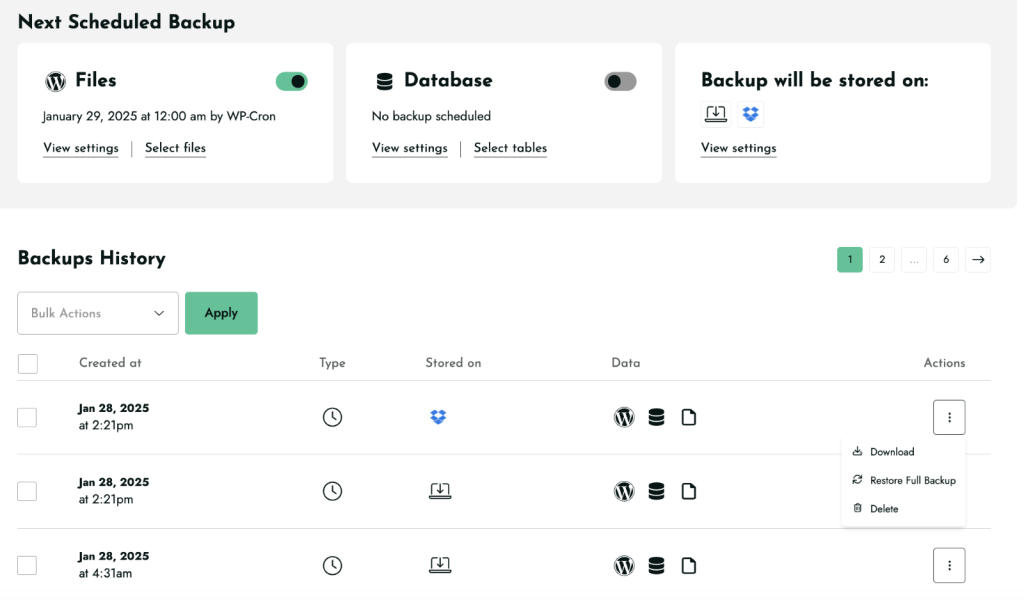
Die neue Benutzeroberfläche bietet Ihnen einen Überblick über Ihre Backup-Aktivitäten auf einen Blick und sorgt dafür, dass die Verwaltung Ihrer Backups genauso effizient ist wie deren Erstellung.
Zwei wesentliche Verbesserungen stechen bei diesem Update besonders hervor:
Nächste geplante Backups
- Übersichtliche Darstellung Ihrer anstehenden Backups
- Zeigt Datum, Uhrzeit und Art Ihrer geplanten Backups an
Backup-Verlauf
- Eine übersichtliche, chronologische Liste Ihrer letzten Sicherungen
- Jeder Eintrag enthält das Datum, die Art und den Status (erfolgreich oder fehlgeschlagen) der Sicherung
- Schneller Zugriff auf Ihr Backup für eine einfache Fehlerbehebung
- Möglichkeit, Ihre Backups direkt von dieser Seite herunterzuladen oder wiederherzustellen
Weniger Registerkarten und eine vereinfachte Menüstruktur
Dank dieser übersichtlichen Gesamtansicht müssen Sie nicht mehr durch mehrere Seiten oder Registerkarten blättern und erhalten sofort einen Überblick über den Status und den Zeitplan Ihrer Backups.
In der vorherigen Version musste man zwischen verschiedenen Seiten hin- und herwechseln, um Aufträge zu verwalten, neue hinzuzufügen und auf Sicherungs- und Wiederherstellungsfunktionen zuzugreifen.
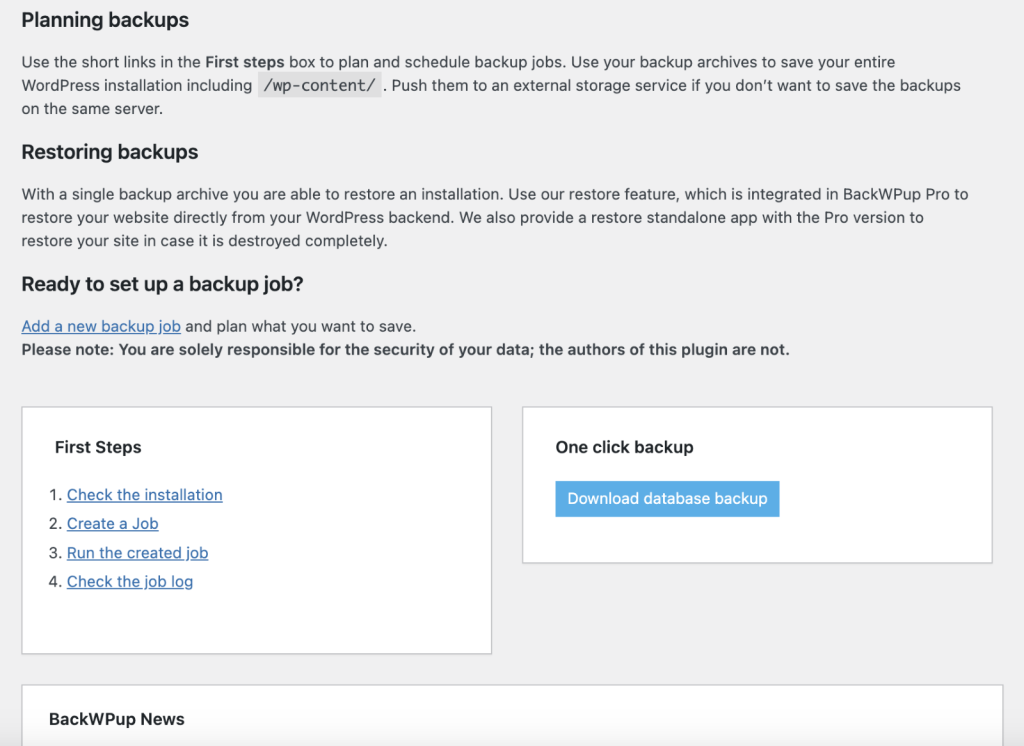
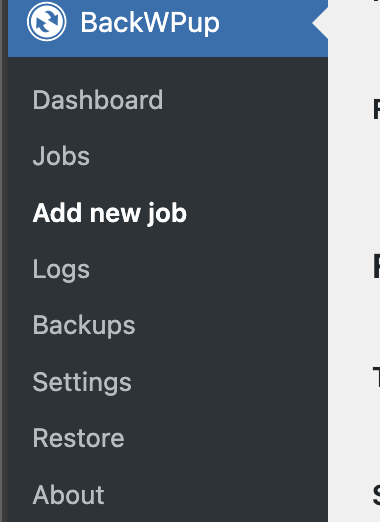
Previously, navigating between separate tabs for Jobs, Logs, Backups, Settings, and more was a necessity. But now, we’ve organized everything logically. The new main menu is your one-stop shop for all things BackWPup. Need to tweak your settings or look for help? It’s all conveniently located under essential categories like Settings, and Docs & Support. No more searching around!
Und das Beste daran: Die Einstellungsseite ist nun Ihre zentrale Schaltstelle für die Datensicherung. Sie bietet einen Überblick über alle Aktivitäten und ermöglicht schnelle Aktionen, damit Sie Ihre Aufgaben effizient verwalten können.

You’ll find that this streamlined structure makes BackWPup not just easier to navigate, but also quicker to master. If you’re new to the plugin, you’ll appreciate how intuitive the new layout is, helping you get up to speed in no time. And for those of you who’ve been with us for a while, you’ll love how efficiently you can now access all the information and controls you need.
Everything’s right at your fingertips, saving you valuable time and making your backup management smoother than ever. Whether you’re setting up your first backup or fine-tuning your hundredth, you’ll feel right at home with BackWPup 5.0’s user-friendly interface.
BackWPup Pro: Elevate Your Backup Strategy
While you may find BackWPup’s free version provides robust backup solutions for your WordPress site, BackWPup Pro offers you an opportunity to elevate your data protection strategy significantly.
Damit erweitern Sie nicht nur Ihre Möglichkeiten zum Schutz Ihrer wertvollen Daten, sondern erhalten auch erstklassigen Support, sodass Ihnen bei Bedarf jederzeit fachkundige Hilfe zur Verfügung steht.
Here’s what the Pro version offers:
Weitere Optionen für Cloud-Speicher
BackWPup Pro expands your storage possibilities with high-quality cloud services: Amazon Glacier, Google Drive, OneDrive & HiDrive. These additional options allow you to create a more diverse and resilient backup strategy, ensuring your data is safe across multiple platforms.
Verschlüsselte Backups
Encrypted backups for enhanced security to ensure your data remains confidential even if unauthorized access occurs. This feature is crucial for your sites handling sensitive information or complying with data protection regulations. In an era where data breaches are increasingly common, BackWPup Pro offers you peace of mind with encrypted backups.
Standalone-Wiederherstellungsanwendung
BackWPup Pro’s standalone restore application is a game-changer for your site recovery. It restores your site without needing WordPress access, perfect for situations where your WordPress installation is compromised. The user-friendly interface guides you through the restoration process & quickly gets your site back online, minimizing downtime.
Funktionen zur Website-Migration
Seamlessly move your WordPress site to a new host or domain with built-in tools to update URLs and paths automatically. Handles database issues & saves hours of manual work and reduces the risk of errors.
Premium-Support
With BackWPup Pro, you get a dedicated ticket system & direct access to our support team through a private channel. To give faster response times compared to free support forums and be among the first to benefit from new features and improvements
When you choose BackWPup Pro, you’re not just getting advanced features – you’re gaining access to a team of WordPress backup experts ready to assist you. Our premium support is designed to provide you with quick, efficient, and knowledgeable assistance whenever you need it. Invest in peace of mind knowing that professional help is just a ticket away.
Umstellung auf das neue Backup-System
- Das Jobs-System wurde ersetzt
Anstelle von benutzerdefinierten Aufträgen stehen Ihnen nun zwei Standardaufträge: Dateisicherung und Datenbanksicherung. Diese Stellen kann nicht bearbeitet werden, aber du kannst sie aktivieren/deaktivieren, den Speicherort auswählen und sie planen oder manuell ausführen.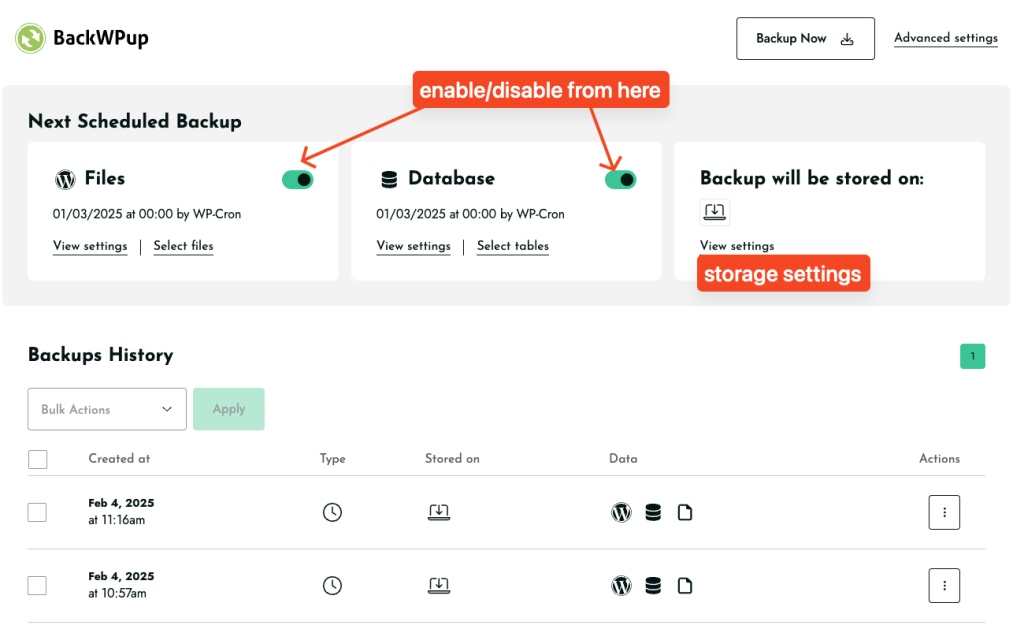
2. „Sichern“ und „Wiederherstellen“ befinden sich nun auf der Einstellungsseite
– Erstellen Sie Backups und stellen Sie Ihre Website direkt von Einstellungen.
– Die alte Wiederherstellungsfunktion ist hier weiterhin verfügbar: admin.php?page=backwpuprestore
3. Alte Stellenangebote sind weiterhin verfügbar
– Deine früheren Jobs wurden nicht gelöscht. Du findest sie hier: admin.php?page=backwpupjobs
– Allerdings sind diese Stellen kann nicht geändert werden im neuen System.
4. Die Planung von Backups hat sich geändert
– Custom scheduling is now Pro-only. Aktualisierung: Aufgrund eures Feedbacks führen wir die alte Terminplanung wieder ein.
– Free version runs backups at preset times:
Täglich: Jeden Tag um 00:00 Uhr (Mitternacht)
Wöchentlich: Erstens Sonntag um 00:00 Uhr (Mitternacht)
Monatlich: Erstens am Tag des Monats um 00:00 Uhr (Mitternacht)
Standard-Dateiformat .tar
Sicherungsarchive werden nun gespeichert in .tar Format anstelle von .zip.
Zum Abschluss
BackWPup 5.0 marks a significant advancement in WordPress backup solutions, offering you a simpler, faster, and more reliable backup process. With its redesigned interface and new 3-Step Backup Wizard, creating and managing backups has never been more intuitive.
Whether you’re new to BackWPup or upgrading from a previous version, version 5.0 provides the robust protection your WordPress site needs. Ready to secure your website’s future? Download BackWPup 5.0 today and experience the next level of WordPress backup technology.