

Table des matières
Updating to BackWPUp 5.0 introduces a completely redesigned interface and a new backup workflow. Here’s what has changed, where to find your old settings, and key things to note.
Table des matières
What Has Changed?
- New 3-Step Backup Wizard
- Backups are now created through a simplified process:
- Step 1 – WHAT: Choose backup content (Files, Database, or both).
- Step 2 – WHEN: Set a backup schedule (Daily, Weekly, Monthly).
- Step 3 – WHERE: Select a backup destination (Local, Cloud Storage, etc.).
- Backups are now created through a simplified process:
- Le système de gestion des offres d'emploi a été remplacé
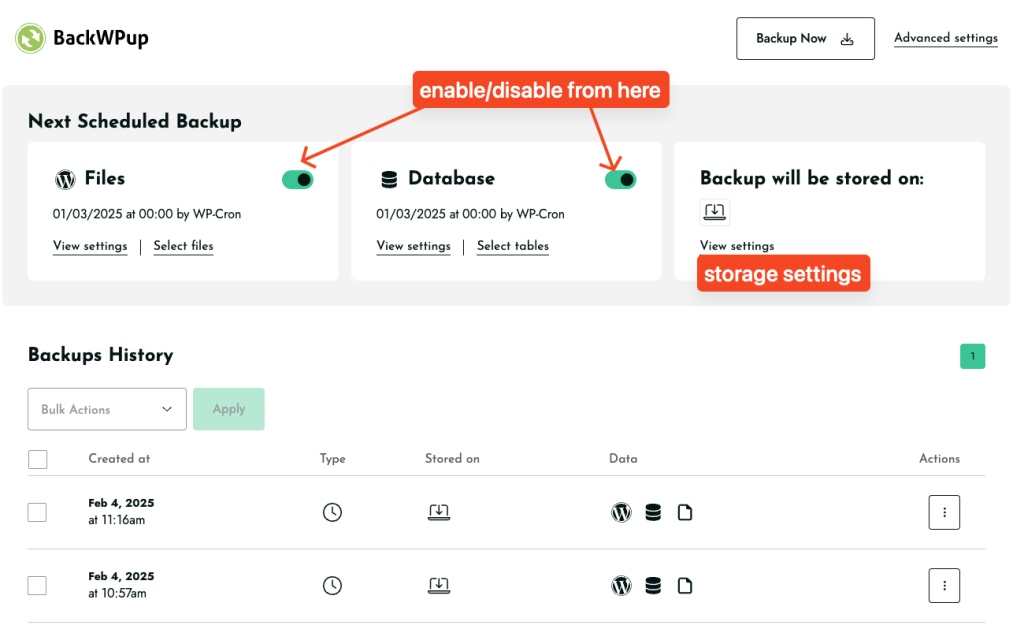
- Instead of custom jobs, you now have two default jobs: Files Backup and Database Backup.
- These jobs ne peut pas être modifié, mais vous pouvez les activer/désactiver, choisir l'emplacement de stockage, et les planifier ou les exécuter manuellement.
- Les options de sauvegarde et de restauration se trouvent désormais dans la page Paramètres
- Take backups and restore your site directly from Settings.
- Old restore functionality is still available here:
admin.php?page=backwpuprestore
- Les anciennes offres d'emploi sont toujours disponibles
- Your old jobs n'ont pas été supprimés. Vous les trouverez ici :
admin.php?page=backwpupjobs - However, these jobs cannot be modified in the new system.
- Your old jobs n'ont pas été supprimés. Vous les trouverez ici :
- La planification des sauvegardes a changé
- Custom scheduling is now Pro-only.
- Free version runs backups at preset times:
- Daily: Every day at 00:00 (midnight)
- Weekly: First Sunday at 00:00 (midnight)
- Monthly: First day of the month at 00:00 (midnight)
- Format de fichier par défaut :
.tar- Les archives de sauvegarde sont désormais enregistrées dans
.tarau lieu de.zip. - User feedback has been passed to the team about adding format options.
- Les archives de sauvegarde sont désormais enregistrées dans
Things to Note & Troubleshooting
- If you experience issues after updating, try reinstalling the plugin to start fresh.
- Dropbox & Cloud Storage Issues? Try re-authenticating your connection:
How to Backup to Dropbox - Seeing mixed v4 & v5 UI? This could be a caching issue—try clearing your browser cache or reinstalling the plugin.
- Want to manually upload a backup for restore? Use this page:
admin.php?page=backwpuprestore
We understand these changes are significant, and we’re actively gathering user feedback to refine the experience. This document will be updated if any adjustments or improvements are made based on feedback.
We encourage you to try a fresh setup, and if any issues persist, please open a ticket here so we can assist you:
BackWPUp Support
Thank you for using BackWPUp!

