

Updating to BackWPUp 5.0 introduces a completely redesigned interface and a new backup workflow. Here’s what has changed, where to find your old settings, and key things to note.
What Has Changed?
- New 3-Step Backup Wizard
- Backups are now created through a simplified process:
- Step 1 – WHAT: Choose backup content (Files, Database, or both).
- Step 2 – WHEN: Set a backup schedule (Daily, Weekly, Monthly).
- Step 3 – WHERE: Select a backup destination (Local, Cloud Storage, etc.).
- Backups are now created through a simplified process:
- Se ha sustituido el sistema de empleo
- Instead of custom jobs, you now have two default jobs: Files Backup and Database Backup.
- These jobs no se puede editar, pero puedes activarlas o desactivarlas, seleccionar la ubicación de almacenamiento y programarlas o ejecutarlas manualmente.
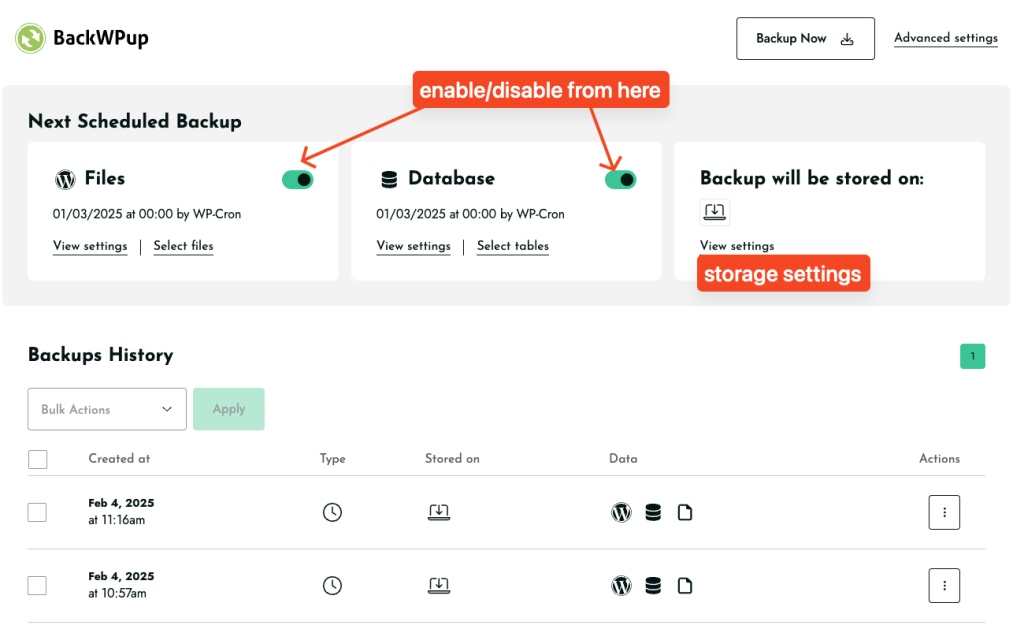
- Las opciones de copia de seguridad y restauración ahora se encuentran en la página de ajustes
- Take backups and restore your site directly from Settings.
- Old restore functionality is still available here:
admin.php?page=backwpuprestore
- Los antiguos puestos de trabajo siguen estando disponibles
- Your old jobs no se han eliminado. Los puedes encontrar aquí:
admin.php?page=backwpupjobs - However, these jobs cannot be modified in the new system.
- Your old jobs no se han eliminado. Los puedes encontrar aquí:
- Se ha modificado la programación de las copias de seguridad
- Custom scheduling is now Pro-only.
- Free version runs backups at preset times:
- Daily: Every day at 00:00 (midnight)
- Weekly: First Sunday at 00:00 (midnight)
- Monthly: First day of the month at 00:00 (midnight)
- Formato de archivo predeterminado:
.tar- Los archivos de copia de seguridad ahora se guardan en
.tarformato en lugar de.zip. - User feedback has been passed to the team about adding format options.
- Los archivos de copia de seguridad ahora se guardan en
Things to Note & Troubleshooting
- If you experience issues after updating, try reinstalling the plugin to start fresh.
- Dropbox & Cloud Storage Issues? Try re-authenticating your connection:
How to Backup to Dropbox - Seeing mixed v4 & v5 UI? This could be a caching issue—try clearing your browser cache or reinstalling the plugin.
- Want to manually upload a backup for restore? Use this page:
admin.php?page=backwpuprestore
We understand these changes are significant, and we’re actively gathering user feedback to refine the experience. This document will be updated if any adjustments or improvements are made based on feedback.
We encourage you to try a fresh setup, and if any issues persist, please open a ticket here so we can assist you:
BackWPUp Support
Thank you for using BackWPUp!

