BackWPup Consente di escludere alcuni file e cartelle dal processo di backup tramite la pagina delle impostazioni. Recentemente abbiamo implementato nuovi hook per consentire di gestire ed estendere queste impostazioni tramite codice. Di seguito è riportato un breve tutorial su come ottenere questo risultato.
Impostazioni di esclusione
Su BackWPup pagina , clicca su Dati sotto la scheda "Backup file", quindi seleziona l'icona a forma di ingranaggio accanto a File per gestire le impostazioni di esclusione.
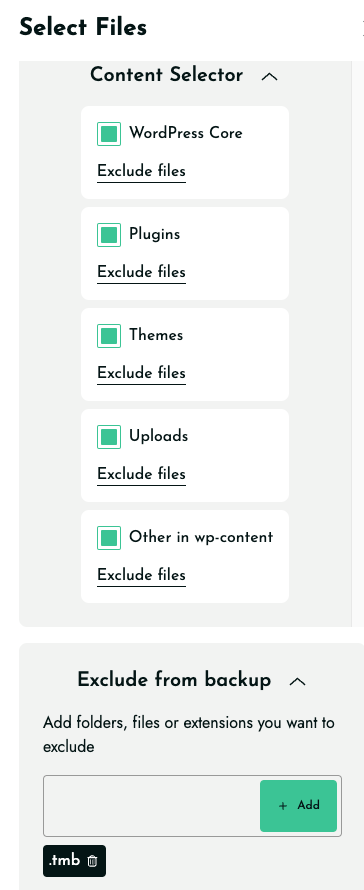
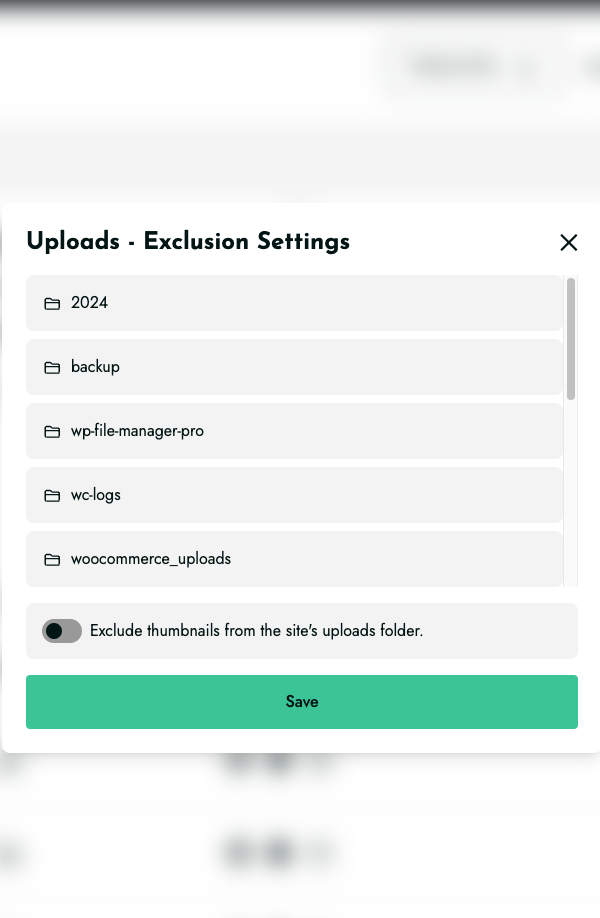
Qui puoi scegliere quali file e cartelle delle tue installazioni non devono essere inclusi nel backup.
Tuttavia, i nuovi hook di filtro consentono ora di ampliare anche alcune di queste possibilità.
Inoltre, invece di gestirlo a livello di back-end, è possibile utilizzare un filtro per impostare un'opzione.
Esaminiamo uno per uno ciascuno di questi spunti.
Aggiungi cartelle da escludere nell'elenco delle cartelle del contenuto del backup
L'hook backwpup_content_exclude_dirs consente di aggiungere directory all'elenco di quelle che si desidera escludere dal processo di backup nella directory wp-content WordPress .
Supponiamo che nella directorywp-content di WordPress siano presenti due cartelle denominate just-a-folder e another-folder. Se si desidera aggiungere queste cartelle all'elenco delle cartelle da escludere dal backup, è possibile implementare il seguente filtro:
add_filter(
      'backwpup_content_exclude_dirs',
      function ($directories) {
          array_push(
                      $directories,
                      'just-a-folder',
                      'another-folder'
                    );
          return $directories;
      }
);
Nelle impostazioni vedrai queste opzioni relative alle cartelle da escludere.
Aggiungi cartelle da escludere in altri elenchi di impostazioni
Allo stesso modo, come descritto nella sezione precedente, se è necessario aggiungere nuove directory da escludere dal backup, è possibile creare un filtro personalizzato. A tal fine, è possibile utilizzare gli hook elencati di seguito:
backwpup_plugins_exclude_dirs
Questo hook consente di ampliare l'elenco dei plugin di backup . Permette di aggiungere le cartelle che si desidera escludere nella directorywp-content/plugins del proprio sito WordPress .
backwpup_themes_exclude_dirs
Questo hook ti permette di ampliare l'elenco dei temi di backup. Ti consente di aggiungere le cartelle che desideri escludere nella directory WordPress wp-content/themes
backwpup_upload_exclude_dirs
Questo hook consente di estendere l'elenco delle cartelle di upload del backup. Permette di aggiungere le cartelle che si desidera escludere nella directory WordPress wp-content/upload
Escludi file e cartelle
Se devi escludere una cartella o un file dalla directory principale di WordPress sul tuo server, puoi utilizzare l'area di testo "Escludi file/cartelle dal backup " nell'interfaccia grafica: basta aggiungere le cartelle e le estensioni dei file che desideri escludere, separate da una virgola.
Ma se vuoi ottenere lo stesso risultato utilizzando un filtro, anche in questo caso è possibile farlo tramite l'hook backwpup_file_exclude.
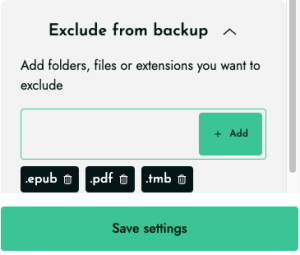
Di seguito forniamo un esempio di implementazione che consente di aggiungere due estensioni di file (.pdf e .epub) all'elenco dei file che si desidera escludere dal backup.
add_filter(
    'backwpup_file_exclude',
    function ($fileExtensions) {
        return $fileExtensions . ',.pdf,.epub';
    }
);
A questo punto, se accediamo alle impostazioni, possiamo vedere come queste due estensioni siano state correttamente configurate nella sezione “Escludi file/cartelle/estensioni dal backup”, come mostrato di seguito.