

Indice
Updating to BackWPUp 5.0 introduces a completely redesigned interface and a new backup workflow. Here’s what has changed, where to find your old settings, and key things to note.
Indice
What Has Changed?
- New 3-Step Backup Wizard
- Backups are now created through a simplified process:
- Step 1 – WHAT: Choose backup content (Files, Database, or both).
- Step 2 – WHEN: Set a backup schedule (Daily, Weekly, Monthly).
- Step 3 – WHERE: Select a backup destination (Local, Cloud Storage, etc.).
- Backups are now created through a simplified process:
- Il sistema di gestione delle offerte di lavoro è stato sostituito
- Instead of custom jobs, you now have two default jobs: Files Backup and Database Backup.
- These jobs non può essere modificato, ma puoi attivarli/disattivarli, scegliere la posizione di archiviazione e pianificarne l'esecuzione o eseguirli manualmente.
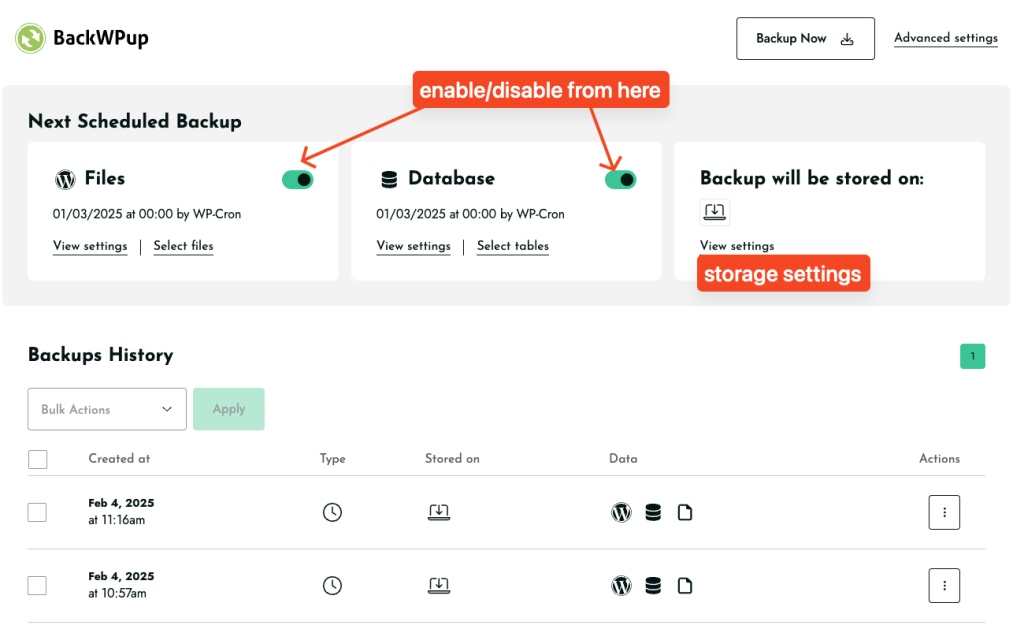
- Le funzioni di backup e ripristino sono ora disponibili nella pagina delle impostazioni
- Take backups and restore your site directly from Settings.
- Old restore functionality is still available here:
admin.php?page=backwpuprestore
- I vecchi lavori sono ancora disponibili
- Your old jobs non sono stati cancellati. Li trovate qui:
admin.php?page=backwpupjobs - However, these jobs cannot be modified in the new system.
- Your old jobs non sono stati cancellati. Li trovate qui:
- La pianificazione dei backup è cambiata
- Custom scheduling is now Pro-only.
- Free version runs backups at preset times:
- Daily: Every day at 00:00 (midnight)
- Weekly: First Sunday at 00:00 (midnight)
- Monthly: First day of the month at 00:00 (midnight)
- Formato file predefinito
.tar- Gli archivi di backup vengono ora salvati in
.tarformato invece di.zip. - User feedback has been passed to the team about adding format options.
- Gli archivi di backup vengono ora salvati in
Things to Note & Troubleshooting
- If you experience issues after updating, try reinstalling the plugin to start fresh.
- Dropbox & Cloud Storage Issues? Try re-authenticating your connection:
How to Backup to Dropbox - Seeing mixed v4 & v5 UI? This could be a caching issue—try clearing your browser cache or reinstalling the plugin.
- Want to manually upload a backup for restore? Use this page:
admin.php?page=backwpuprestore
We understand these changes are significant, and we’re actively gathering user feedback to refine the experience. This document will be updated if any adjustments or improvements are made based on feedback.
We encourage you to try a fresh setup, and if any issues persist, please open a ticket here so we can assist you:
BackWPUp Support
Thank you for using BackWPUp!

